
This article gives some tips to prevent phishing attempts, the main rule being vigilance in all circumstances
-
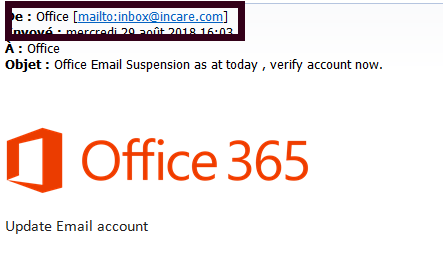
When you receive an email, always check the actual address of your sender
In the example below, the message appears to come from Microsoft / OFFICE 365. A careful reading of the sender's address reveals that it does not come from the @ microsoft.com domain as one would expect, but from the domain @ incare.com
-
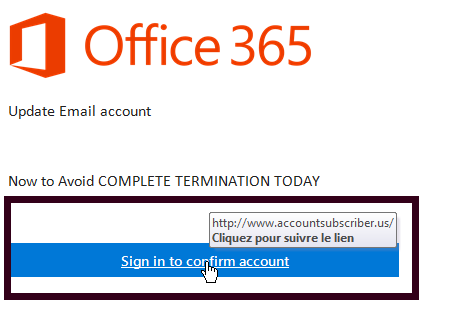
Before clicking on a link contained in a message, you must always check the link
In the example below, the sent message is asking you to validate your Office 365 credentials by clicking a link. A simple highlight on the link with your mouse reveals that the associated web address does not correspond to an accredited address.
-
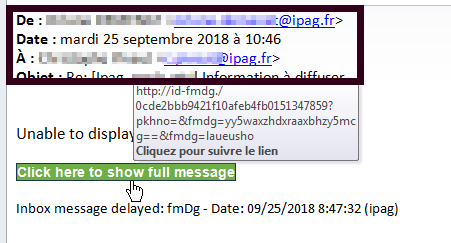
Even if you receive a message from someone you know, always be cautious
In the example below, the message is from a known e-mail address but the link points to an address that does not match this e-mail address.
-
In general, it is better not to follow the links included in emails. Instead, you can open a new window and manually enter the address.
Whenever possible, prefer to manually enter the address of a site in your browser rather than clicking on a link received in a message.
-
When searching for a site in your internet search engine, never click on the first link that appears
In your search engine, never click on the displayed link . Take time to check that the proposed link is the one you are looking for. Always prefer sites starting with https rather then http.
Comments
0 comments
Please sign in to leave a comment.